
Engagement and Interaction Design
Select the image to open the course in a new tab.
Excerpt from Adding Media to Created Content
The Learners
Instructional Designers
The Challenge
Clarify the what, where, how, and why for using images in online courses and other deliverables.
The Design Strategy
I was given the rough content to develop into a course to support internal processes. I revised the content and chunked it for cognitive load. I built a variety of interactions in the Rise course separating the information that should be understood from the aspects that require references for later use. I created examples that explained concepts.
The Experience
For the section about types of media, I used Storyline to create a learning experience that focused on explaining the different types of media using the media being discussed. I made opportunities for fun, discovery-based interactions to motivate using novelty and encourage exploration.
Technology
Articulate Rise 360
Articulate Storyline 360 for the Quizzes
Photoshop
Canva
Select the image to open the course in a new tab.
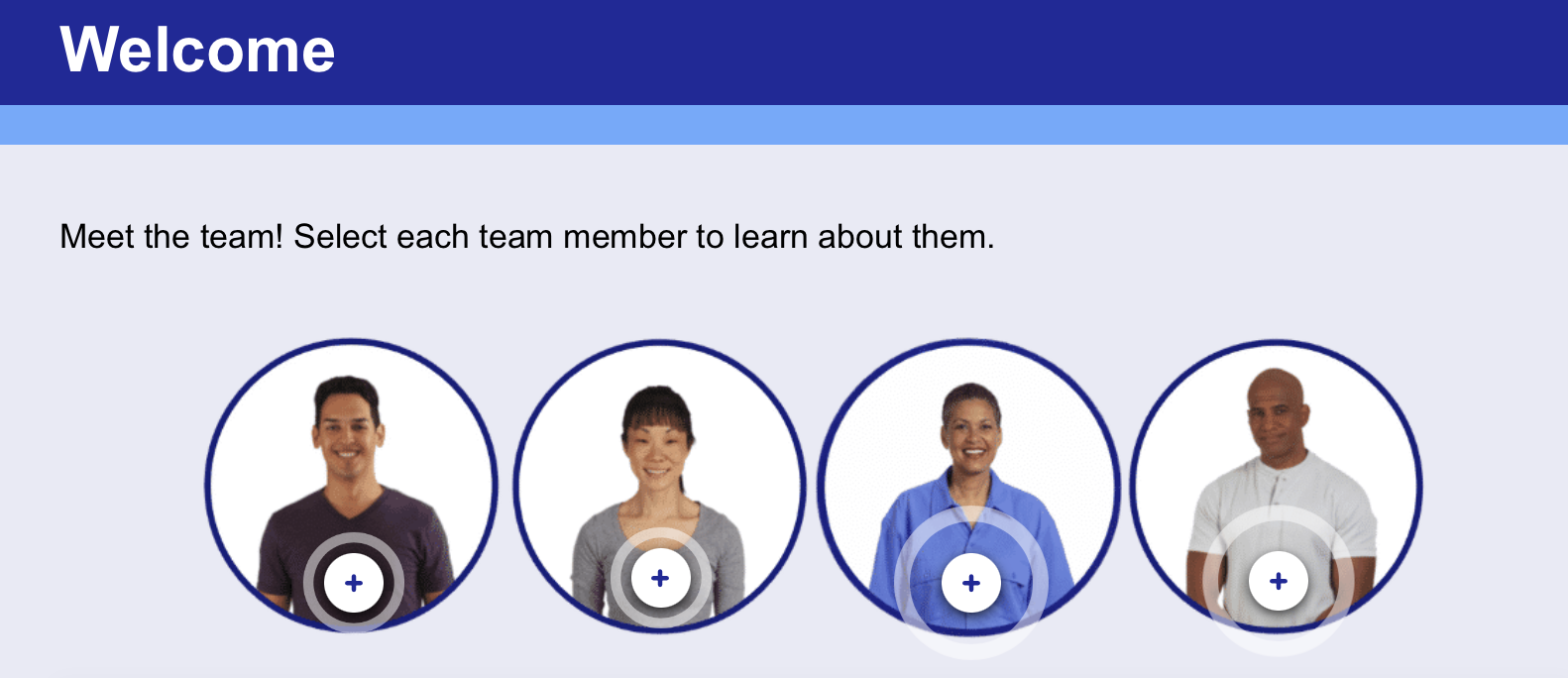
Pedagogical Agents (Articulate Rise)
These blocks are a few excerpts from one of the course modules.
The Learners
New employees in manufacturing
The Challenge
My team is creating a general focus onboarding course for new employees in the manufacturing industry. Learners may be totally new to the field and may need reinforcement of the concepts and opportunities to see themselves in the work.
The Design Strategy
I brought this idea to my team and the client and helped with the graphics. My team members wrote the content and designed it in Rise. We created a character-driven team to add storytelling and immersion to help learners increase their connection to the concepts and navigate the course.
The Experience
The first character, Gabriel, is a new employee and an analog for the learner. He discovers processes at the plant and learns from the other team members. His questions and discoveries lay the groundwork for the lessons that follow. Each section ends with one of the senior members asking a question to help the learner check their understanding. Part of the use of this strategy is striking the appropriate balance between length and value. We avoid adding unnecessary reading and make sure that each interaction creates meaning and connection.
Technology
Articulate Rise 360
Articulate Storyline 360 for the characters
Photoshop
Select the image to open the course in a new tab.

Supporting Backyard Birds of North Carolina (Storyline)
The Learners
General Public
The Challenge
The general public is not knowledgeable about ways to support local avian wildlife.
The Design Strategy
This module was developed as a brief sample of Storyline 360 eLearning. It is a fun and engaging tool for the general public to learn more about local birds. I used Gagné’s Nine Events of Learning and chunking to reduce cognitive overload and prioritized fun, engaging visual design and interactivity.
I wrote, designed, and built this module.
Technology
Articulate Storyline 360
Photoshop
Animaker
Scroll to view the mission book.
Excerpt from Washington DC Guidebook Experience Design
The Learners
My two elementary-aged children
The Challenge
We planned a trip to Washington DC for spring break. I wanted to create a way to help my children understand a new environment, find motivation to learn, connect the information that they would take in, and find a place to record ideas.
The Design Strategy
I created a custom book for each child that framed the whole trip as a secret mission and targeted their individual interests. This framing alone creates motivation and curiosity for self-driven motivation. The book contained puzzles, codes, sticker-badges for completing activities, scavenger hunts, reflection activities, and collaborative tasks. I framed all of the rules that parents give for navigating a new place as Secret Agent training. I also included maps so that the children could take charge of navigating the group. The book was printed, organized into sections with tabbed dividers, and spiral-bound. The achievement badges helped to prompt engagement without the need for intervention. They weren’t required to use the book, but they did because it was fun. I determined all of the components and used AI to help in brainstorming questions and activities.
The Experience
The children used the book all week and it helped them navigate the activities and manage focus with all of the activities. They noticed things because they were looking to complete puzzles or scavenger hunts. They reflected on experiences and made connections across different activities. The book gave them something to do while we were waiting, too.
The Outcome
Not only did the book help them navigate the trip, but afterwards, it provided a record of their adventures for remembering and sharing.
Technology
MS Word
Adobe Acrobat
Canva (graphics and video)
Cricut for stickers and perforated window to reveal secret missions
Genially
Select the image to open the course in a new tab.

Excerpt of Approaches to Design (Articulate Rise)
The Learners
Undergraduate students in Theatre Design courses
The Challenge
New designers benefit from a framework for using visual research to develop a conceptual idea.
The Design Strategy
This module was developed using the Dick and Carey Instructional Design Model and Gagné’s Nine Events of Instruction. The module incorporated video, images, gifs, and a branching scenario quiz as instructional elements. Assessments included a pretest, self-checks, reflective writing, a post-test, and an attitude survey.
The Outcome
The module was tested with learners from the target population with good results. Learners reported less confusion at the beginning of projects. Project outcomes improved from quicker starts and increased confidence.
I wrote, designed, and built this course.
Technology
Articulate Rise 360
Articulate Storyline 360 for the Quizzes
Photoshop
Procreate
Keynote
Loom Screen Capture software
MS Forms
Moodle LMS for uploading SCORM
This is a video walkthrough of the interactive powerpoint learning module.

4 Tips for Subtractive Sculpting (PowerPoint)
The Learners
Beginning sculptors in a work or educational setting
The Challenge
Teach four concepts that will radically change the way that artists approach sculpting out of wood or other subtractive media.
The Design Strategy
This interactive lesson allows learners to navigate through four important concepts in planning and creating a successful sculpture. Subtractive sculpting, or carving, can be hard because you can’t always add material to correct mistakes. The module uses images, video, interactive objects, and quizzes with feedback to illustrate four concepts.
One of my key interests is finding the fun in learning and I used that to develop fun sequences that simulate the skills involved in this lesson.
Technology
Powerpoint
iMovie
Procreate
Photoshop
Audacity
Canva